How to digitize paper batch records without losing the source

In brief
Digitizing a paper batch record means reading every value on the executed record, including handwritten entries, corrections and signatures, and loading into a defined schema, with each value linked to the location it came from. The steps are to define the schema, capture a good image, extract, check against rules, have an expert review flags, and deliver the approved data. Keeping the link to the source at every step is what makes the result usable in regulated work.
Key takeaways
- A scanned batch record is a picture of the record; digitizing it means extracting each value into a schema with a reference back to the page it was read from.
- A correction on a paper record carries the original value, the new value, the initials and the date, and all four belong in the digitized record.
- Values read with low confidence, or that fail a rule, should be flagged for expert review beside the source image rather than filled in automatically.
- FDA's 2018 data integrity guidance accepts electronic true copies only when they preserve the content and meaning of the original.
- 21 CFR 211.188 lists what a batch record must contain, including the identity of the people who performed and checked each significant step, so the schema should capture signatures and initials, not only numbers.
What makes a paper batch record hard to digitize
An executed batch record is a printed master record completed by hand as the batch runs. It holds dates and times, equipment IDs, material lot numbers, weights, in-process results, yields, deviations, and a signature or initials for each significant step. A single batch can run to dozens of pages.
Four features make it harder than most documents:
- Handwriting in small fields, often written quickly with a gloved hand.
- Corrections struck through once, with the new value, initials, and date beside them.
- Margin notes that add context no field was designed for.
- Tables that span pages, with units in headers and values in cells.
A method that reads only printed text, or that drops corrections, will produce data that looks complete and is not.
Step 1: Define the schema before extracting anything
Start with the output, not the scanner. List the fields and tables the record contains and what each one means in the operation's own terms: field names, units, allowed values, and which fields must carry a signature. 21 CFR 211.188 is a useful checklist of what a complete record includes.
Include fields that are easy to forget:
- The performer and checker for each step
- Correction history for any value
- Free-text comments and margin notes
- Page and step references, so every value can be traced
Step 2: Capture an image worth reading
Extraction quality starts with the image. Scan at a resolution that keeps small handwriting legible, keep pages straight and complete, and capture both sides where both are used. If the scan will also serve as a true copy, capture it through a controlled process so it can be verified against the original.
Step 3: Extract every value with its location
Read the printed form, the handwritten entries, the tables, the symbols and the margin notes on every page. Each extracted value should carry its location: page, field or table cell, and the region of the image it came from. That location is what lets a reviewer check the value later in one step.
Step 4: Check the data against rules
Rules catch errors that reading alone will not. Write them for the specific record:
- Required fields are present and signed.
- Times run in order and hold times are within limits.
- Weights and yields fall within expected ranges and add up.
- Units are consistent with the field definition.
- Material lot numbers match the format the operation uses.
Anything that fails a rule is flagged, not corrected silently.
Step 5: Review flagged values beside the page
An expert reviewer sees each flagged value next to the image it came from and resolves it: confirm, correct, or mark as unreadable. Values read with low confidence go through the same review. The reviewer's decision is recorded, so the final record shows what the system read, what was flagged, and who resolved it.
This step is where the experts stay in control. It is also where most of the time savings come from, because reviewers only need to look at the values that need them.
Step 6: Deliver approved data and keep the link
Once approved, the structured record goes to its destination, such as a data platform or an analysis workflow. The link from each value to its page travels with it. Months later, anyone looking at a yield in a trend chart can open the page it was read from.
That is the difference between digitizing a record and retyping it. Document Intelligence follows this sequence, and the approved data can also feed the Context Layer, where a batch record can be read alongside the certificates and lab results that relate to it.
A worked example
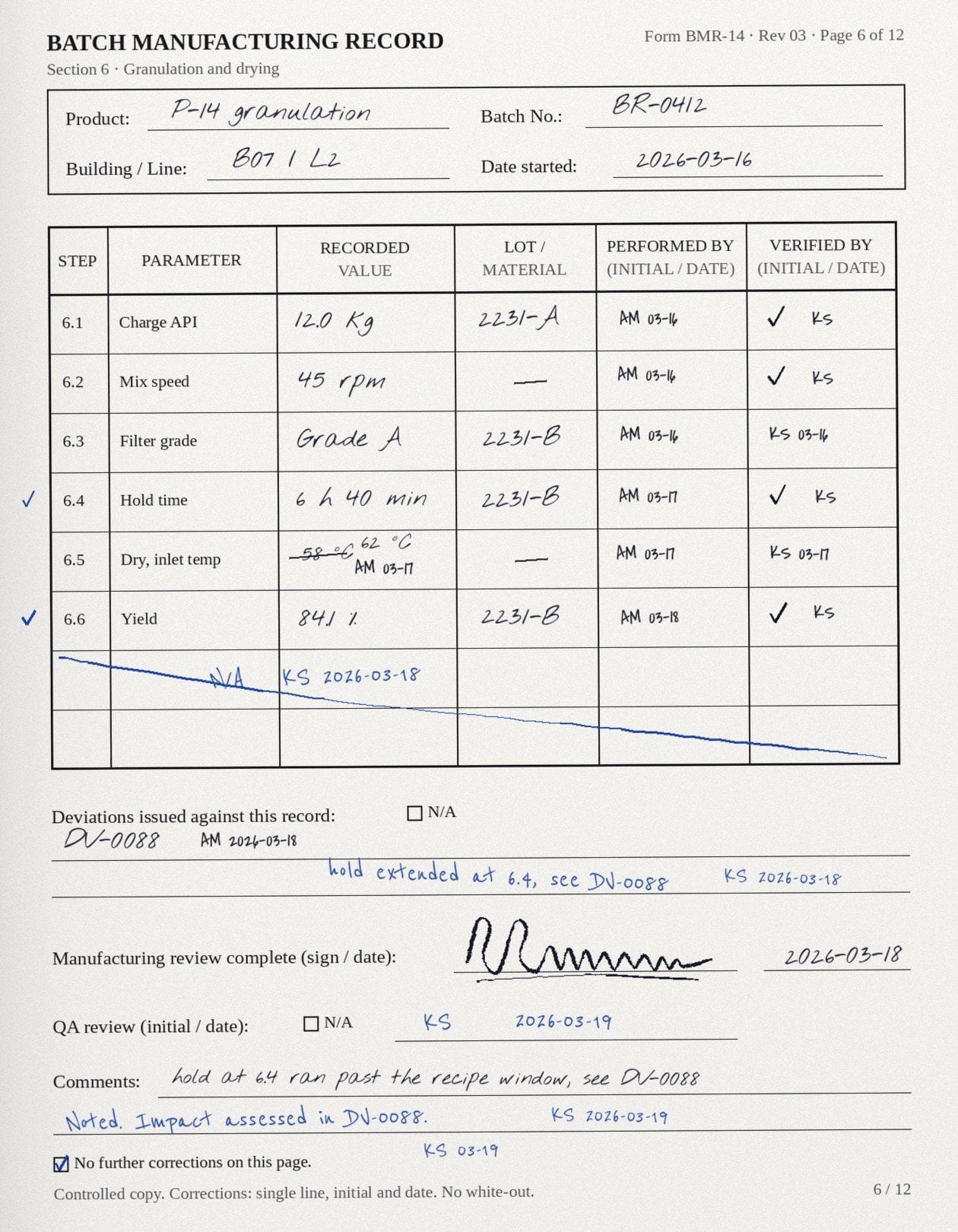
On batch BR-0412 of product P-14, page 7 records a hold time. The operator first wrote 4.5 hours, struck it through, wrote 5.5 hours, initialed and dated the change. A margin note reads "timer reset, see DV-0088."
A good digitized record keeps all of it: the corrected value of 5.5 hours, the original 4.5 hours, the initials and date of the correction, the margin note and the reference to deviation DV-0088, each linked to page 7. If the hold time exceeds its limit, a rule flags it, and the reviewer sees the value, the correction, and the note together.
Note: Values in the description are illustrative only.
Questions
- Can handwritten batch records be digitized accurately?
- Handwritten records can be digitized, but accuracy depends on the handwriting and the image quality, so it should be measured on the operation's own records. A governed process flags values read with low confidence for expert review against the source image instead of passing them on.
- How should corrections on a paper batch record be captured?
- A correction should be captured with the original value, the new value, the initials, and the date, all linked to the page. Keeping only the final value loses part of the record.
- Do we still need the paper originals after digitizing?
- FDA and MHRA both allow verified true copies to stand in for originals when they preserve the content and meaning of the record, including its metadata. Whether to keep or destroy originals is a decision for the operation's quality system and risk assessment.
- Is digitizing paper records the same as moving to an electronic batch record system?
- No. An electronic batch record system captures new batches electronically as they run. Digitization reads records that already exist on paper or as scans, including historical batches and records received from contract manufacturers.
Sources
- 21 CFR 211.188, Batch production and control records, U.S. Code of Federal Regulations, October 6, 2026
- Data Integrity and Compliance With Drug CGMP: Questions and Answers. , U.S. FDA., December 1, 2018
- 'GXP' Data Integrity Guidance and Definitions, Revision 1, MHRA, March 1, 2018
Read next
- September 15, 2026The complete guide to pharmaceutical document digitization

Pharmaceutical document digitization is the process of reading GxP records such as executed batch records and certificates of analysis into a defined schema, with every value linked back to the page it came from. A scan by itself is a picture, not data. Done well, digitization produces structured data that reviewers can check against the source, that meets the regulatory expectation for accurate and complete records, and that other work can build on. This guide covers how digitization works, what OCR is and how to evaluate its accuracy, and how to build trust with digitization technology.
- September 21, 2026Why unstructured records slow regulated operations

In pharmaceutical operations, much of the evidence behind a batch sits in unstructured records: paper batch records, supplier certificates of analysis, lab reports and deviation records that no system can query. The records are complete and controlled, but answering a question across them means finding, reading, and retyping them by hand. That slows investigations, supplier qualification, and batch review, and it keeps experts on assembly work. Turning those records into structured, source-linked data removes that step without replacing the systems that hold them.
Document Intelligence
Turns records from suppliers, CROs, CDMOs and your labs into contextualized, source-linked data.
See How It Works